
We built a
Smart Cursor
This is the story of how we invented a new interaction pattern, and how we made it the most trusted touch-point for value discovery, personalization and monetization.
A growing ecosystem
QuillBot started as a simple paraphrasing product, but it quickly evolved into a broader ecosystem for creating, refining, and understanding information used by more than 35 million people worldwide.
My challenge was figuring out how to seamlessly weave our growing list of AI features directly into people's natural writing habits, regardless of where they were typing.

As we expanded into a full suite of creativity tools, our browser extension faced a scaling issue.
Every new capability required a new button or entry point. The experience became incredibly fragmented, leading to poor discoverability, higher interface complexity, and frequent interruptions to the user's actual writing flow.

We realized that while individual buttons solved local problems, we needed to rethink the broader question of how users should interact with AI while they write.
Cross-Functional Alignment
& The Bigger Picture
The turning point came during a cross-functional workshop I facilitated to align our product and engineering teams. We realized that fixing the Chrome extension in isolation wasn't enough. We needed a universal interaction model that works seamlessly on all websites such as Gmail, Gdocs, chatGPT, whatsapp, notion etc while also eventually scale to our upcoming macOS and Windows desktop apps.
We agreed on a singular vision: creating a frictionless, system-wide writing assistant that felt seamless everywhere user writes, starting with the browser.
Need for a unified ecosystem
Delivering a universal interaction pattern required serious backend alignment. I worked closely with engineering to help align on a scalable structure, the team placed special focus on code quality from the very beginning by writing it in a reusable, modular way.
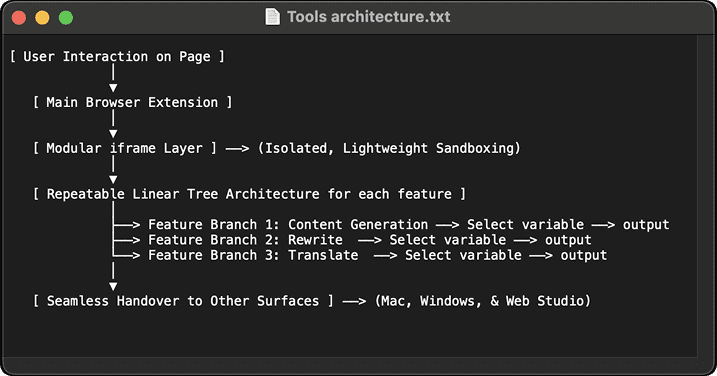
Rather than building a complex model, we opted for a simple iframe architecture with a repeatable linear tree structure. This allowed us to easily hand over capabilities to other surfaces without reinventing the wheel. By relying on this modular foundation, we could ship features like text generation, image creation, and voice-to-text super fast, triggered entirely by user intent while keeping operational costs low.
"Reimagining the cursor
for the AI era"
The Idea
We pitched a deceptively simple concept for the extension: secretly replace the normal blinking line cursor with a smart AI cursor that gives one-click access to all writing tools.
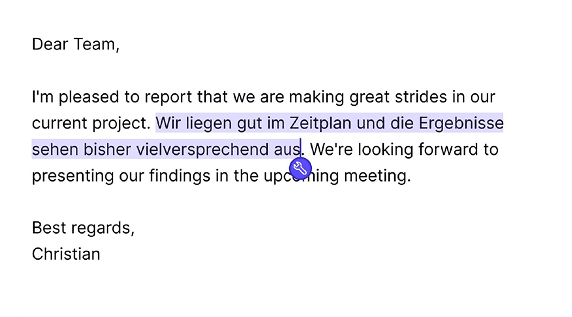

We anchored this on three design principles:
One predictable access to AI tools with minimal interruption to writing flow
Scalable interaction model across products
Faster experimentation and feature rollouts
With some deliberate tradeoffs:
Consistency over specialized workflows
Platform thinking over individual feature optimization
Learning velocity over perfection during MVP
One month sprint
We knew this was a delicate interaction, so we intentionally started by testing it within the Language Tool extension to validate the concept before touching the broader QuillBot ecosystem.
The early signals were encouraging: we saw a 30% increase in AI tool discovery and a 7% increase in retention for users who engaged with it. Following this, we did a phased rollout to QuillBot by August 2024.